Transmit limits
A radio transmits through more than itself: the antenna an antenna switch selects for it, and an amplifier while it operates. Give each one the frequencies it takes and the power it stands, and the station keeps the radio within all of them, however the radio is keyed and whoever keys it. You set them as the administrator, in Settings › Station under Radios & devices.
What limits a radio
The station checks the radio against each part of its signal path:
| Part | Its frequencies | Its power |
|---|---|---|
| The radio | The transmit ranges Hamlib gives for its model, with the bands you set in its Bands (see The bands of a radio) | None |
| The antenna selected on the antenna switch related to the radio | Its Frequencies, any frequency where it has none | Its Maximum power (W), while no amplifier operates |
| Each amplifier related to the radio, while it is in Operate | Its Frequencies, or the ranges Hamlib gives for its model | Its Drive limit (W), the most the radio may put into it |
| The operator class of the user the radio transmits for | The frequencies of the class, which limit tuning too | The power of each range, while no amplifier operates |
The antenna switch that counts is the one related to the radio with the Antenna number of the antenna port the radio is on. Where there is none, it is the switch related without a number (see Relate it to the radio).
The radio may transmit on a frequency that every part allows, at the lowest power limit among them. Once an amplifier operates, the antenna gets the output of the amplifier, which the station doesn’t set. So the drive limit of the amplifier holds the radio instead of the maximum power of the antenna, and the station watches the output of the amplifier (see The output of an amplifier).
- The limits of the devices hold everyone, administrators included. They are what the hardware stands, not a permission. An operator class holds its holders alone (see Operator classes).
- The limits of the devices hold transmitting alone. The radio still tunes anywhere it receives, and the band menu marks a band where it doesn’t transmit now RX only.
- The frequency checked is the one the radio transmits on, the split frequency while split is on. The station reads it from the radio as it keys, so a change on the front panel a moment before counts.
Set the limits of an antenna
Open the antenna
Open Settings › Station › Antenna switches & relays, choose the switch, and open its Connection tab. Under Antennas, choose the pencil of the antenna. Or open the antenna on the page of the switch, in Edit (see Antenna switches and relays).
Add its frequencies
Under Frequencies, type each range the antenna takes, From (kHz) and To (kHz), both included. Add a range adds another, and the bin removes one. The buttons under Bands add a whole band, or remove it again. A band the antenna already covers shows pressed.
Give its power
Type the Maximum power (W) the antenna stands. The output power of the radio is held at or below it while no amplifier operates. Leave it empty for no limit.
Save
Choose Save in the dialog. On the Connection tab, also choose Save in the bar at the bottom of the page. On the page of the switch, the change is saved as you make it.
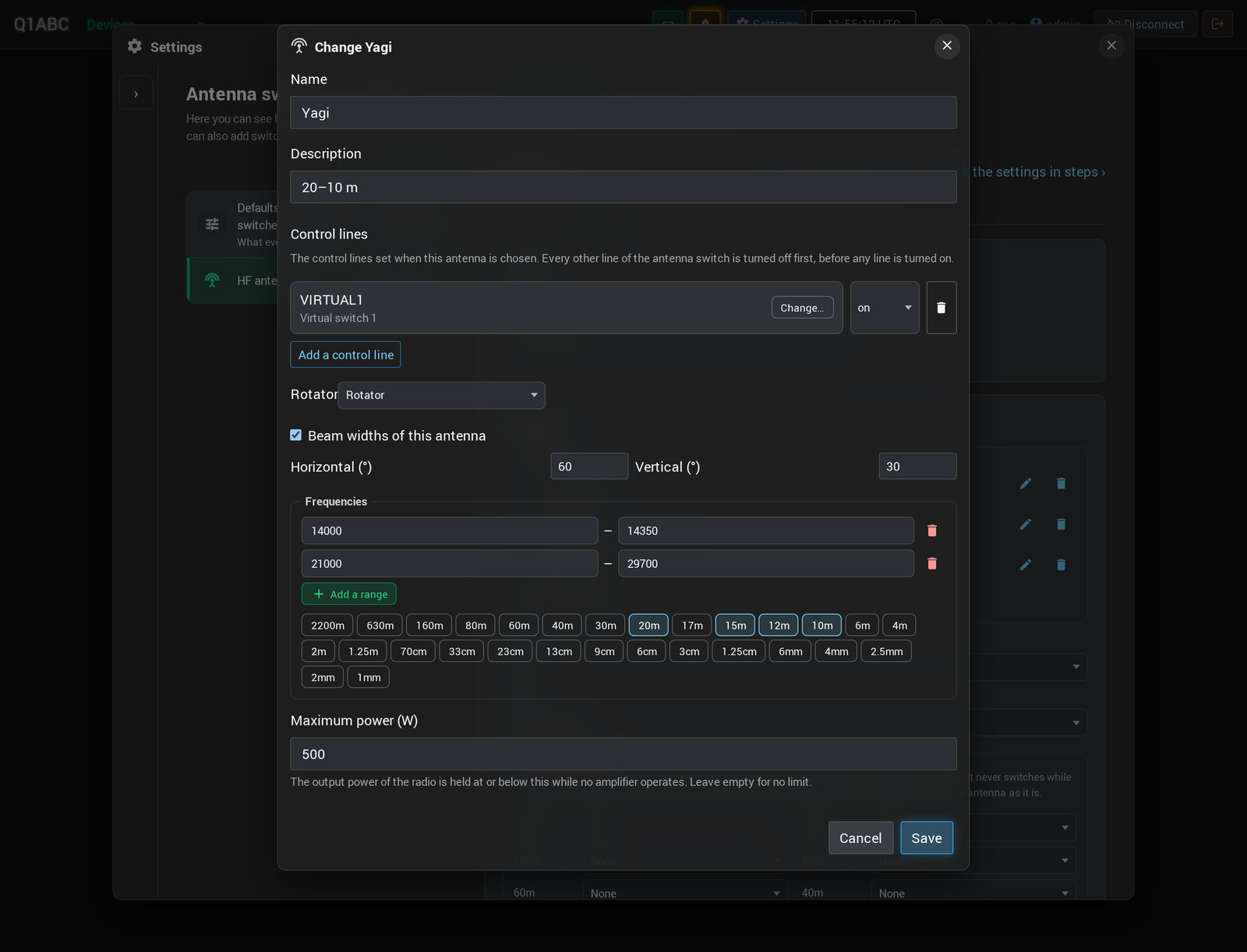
Without frequencies, the antenna sets no frequency limit. A band can be the preferred band of an antenna only if its frequencies reach that band.
Set the limits of an amplifier
The limits of an amplifier are on its Limits step as you add it, and on its Connection tab later:
- Frequencies: the ranges the amplifier works on. Without any, the station uses the ranges Hamlib gives for the model, shown as None set. The amplifier operates where Hamlib says the model transmits, …. Edit the Hamlib ranges copies them to change.
- Drive limit (W): the most power the radio may put into the amplifier while it operates.
- Rated output (W): the most the amplifier puts out. The station watches its output against it.
- Tune the radio into its frequencies at OPERATE: tunes the radio to the nearest band the amplifier takes as the amplifier goes to Operate, if the radio is outside its frequencies.
A change of the connection of an amplifier is saved first and applied with Apply and restart (see Save and apply a change).
Set the full output of a radio
A power limit is in watts, but the RF power of a radio is a level, from none to full. The station turns one into the other by the Full output power of the radio, on its Operating tab under Transmitting: 50% of a 100 W radio is 50 W. Without it, the station uses the power Hamlib gives for the radio. Set it where Hamlib gives the power wrongly, or not at all (see Radio settings).
Where a power limit applies and the station can’t tell the power of the radio in watts, it doesn’t key the radio.
What the station does
- Keying outside the limits is refused: the PTT, CW, Tune, a test that transmits, and the links of WRC Link. The operator is told why, such as IC-7610 does not transmit on 7,100 kHz. That frequency is outside the frequencies of the antenna Yagi.
- The RF power is lowered before keying. If the RF power is above the limit, the station sets it to the limit first, and says so, such as The RF power of IC-7610 was lowered from 100 W to 50 W, the most the antenna Yagi can take. It stays there. Raise it again after you change antennas.
- An RF power set above the limit in the Controls drawer, or by an application through WRC Link, is set to the limit.
- Tuning while transmitting is refused where the radio would then transmit outside the limits. The keys and dial of the radio, whose frequency the station can’t tell before they run, are refused while it transmits.
- A radio found transmitting outside its limits is released. A radio keyed from its front panel, by VOX or by another application, outside its frequencies or above its power, has its PTT released by the station.
Every lowering, release and refused tuning is in the events of the radio, with who keyed it.
As an amplifier goes to Operate
As an amplifier goes to Operate, the RF power of the radio that drives it is lowered to the drive limit at once, and its users are told. As the amplifier goes back to standby or is switched off, the power the radio had before is set back, but only if nobody changed it meanwhile, and only as far as the limits that hold then, such as the maximum power of the antenna.
The output of an amplifier
While an amplifier operates, the station reads its forward power and compares it with the lower of the Maximum power (W) of the antenna selected and the Rated output (W) of the amplifier. Two readings in a row above it release the PTT of the radio, as for a radio outside its limits, such as ACOM 1000 put out 812 W, above 500 W, the most the antenna Yagi can take. Web Radio Control released the PTT of IC-7610. One reading above isn’t enough, so that a meter overshooting for a moment as the radio keys doesn’t end the transmission. With neither a maximum power nor a rated output, nothing is watched.
Where operators see them
- The band menu marks a band where the radio doesn’t transmit now RX only, and says why, such as Receive only: outside the frequencies of the antenna Yagi. The marks follow the antenna selected and the amplifier going to Operate and back.
- The RF section of the Controls drawer tells the limit, such as RF power limited to 50 W (50% of 100 W): the most power the antenna Yagi can take (see The Controls drawer).
- The page of the amplifier tells the drive limit while the amplifier operates (see The amplifier).
- Notifications tell a refusal to the user refused, and a lowering, a setting back or a release to every user of the radio.
A device hidden from a user still limits the radio they use, without its name.
Tune the radio into the limits
Two choices, each off unless you turn it on, tune the radio rather than leave it unable to transmit:
- Tune the radio to the antenna’s band, on an antenna switch under Antennas: as an antenna is selected that doesn’t cover the frequency of the radio, the radio goes to the nearest band the antenna is preferred on.
- Tune the radio into its frequencies at OPERATE, on an amplifier: as the amplifier goes to Operate with the radio outside its frequencies, the radio goes to the nearest band inside them.
Neither tunes a radio while it transmits or while split is on. Each tuning is in the events of the device.