Band plans
A band plan holds the bands and their segments: the modes and bandwidth of each segment, and its centers of activity. The band menu, band up and down, the band plan bar of the radio page and the modes of the spots follow it. Web Radio Control ships the band plan of each IARU region. Here you choose the band plan of the station, and make custom band plans for it, such as one that follows the rules of your country. You do it in Settings › Station › Band plans, as the administrator.
Each operator may choose a band plan of their own in My settings › Bands. Until they do, they follow the band plan of the station (see The band menu).
The band plans shipped
| Band plan | Copied from |
|---|---|
| IARU Region 1 | The IARU Region 1 HF band plan, and the band plans of the IARU Region 1 VHF Handbook from 50 MHz up |
| IARU Region 2 | The IARU Region 2 band plan |
| IARU Region 3 | The IARU Region 3 band plans |
They are updated with the software, and are read only, tagged Shipped. Open one to see About this band plan: its Region, its Edition and the documents it was Copied from, and each band with its edges. A band plan is a recommendation. Where it differs from the rules of your country, your rules apply. Their IDs, editions and band edges are in The band plans shipped.
Choose the band plan of the station
Open Settings › Station › Radios, choose Defaults for radios, and on its Operating tab choose the Band plan. Every user who hasn’t chosen a band plan of their own follows it, and the modes of the spots are guessed by it. It is IARU Region 1 unless you choose another. The list of Band plans marks it Station band plan.
Make a custom band plan
A custom band plan starts from another band plan, shipped or custom, and changes its bands. It follows that band plan: when Web Radio Control updates a shipped band plan to a new edition, the bands you kept follow it, and the bands you changed stay yours.
Start from a band plan
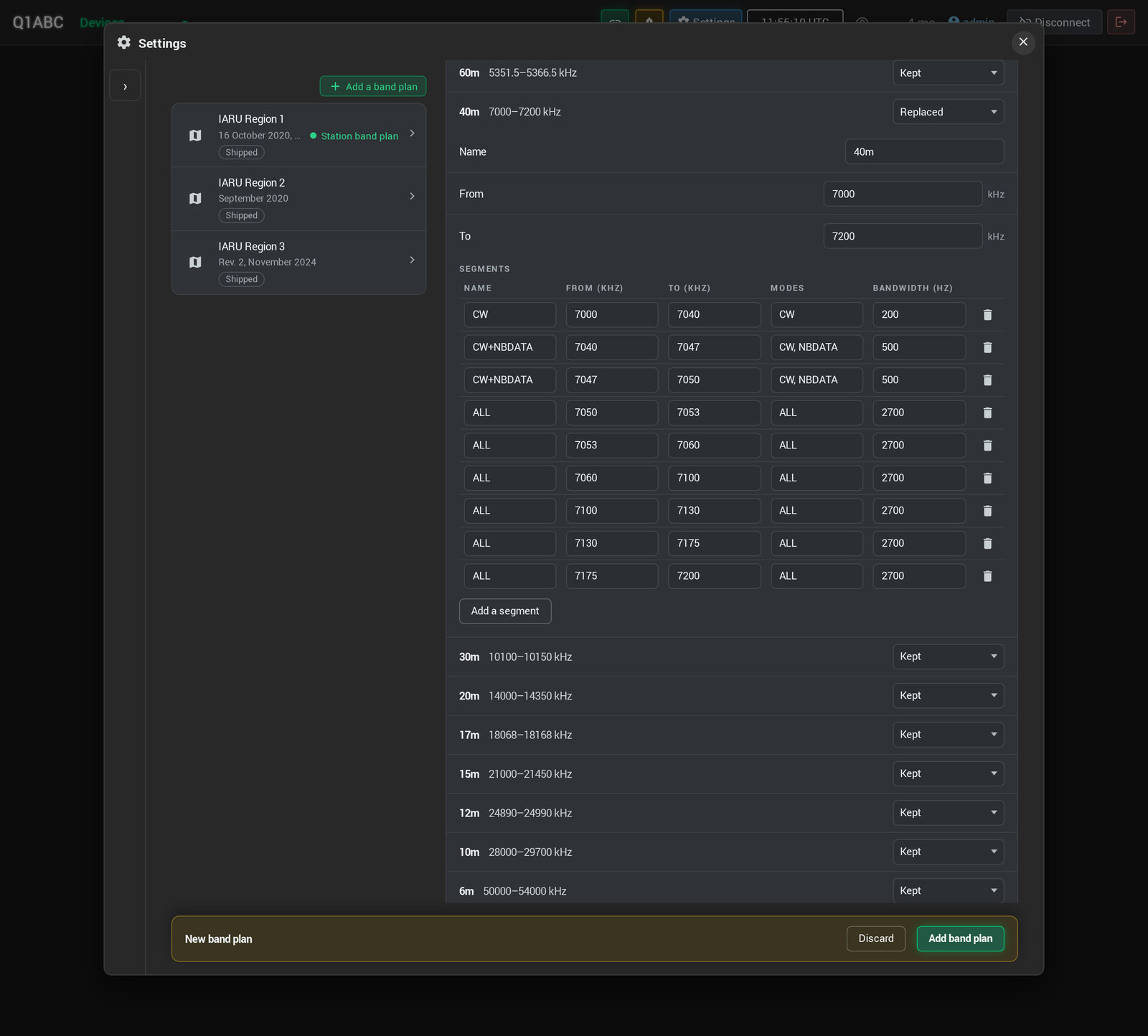
Open a band plan in the list and choose Make a band plan. Or choose Add a band plan, which starts from the band plan of the station. A page for the New band plan opens.
Name it
Type its Name, such as Contest plan. The band plan gets an ID made from the name, which stays the same when you rename it. Made from is the band plan it starts from. Optional: a Region, the IARU region whose transmit ranges the radios follow with it, the same as the base band plan unless you choose another, and a Description, which only administrators see.
Change its bands
Under Bands, each band of the base band plan is Kept as it is, Replaced by your own edges and segments, or Removed. A band replaced starts as the band of the base, with its segments, so you change only what differs: its Name, From and To, and its Segments, each with its Name, From (kHz), To (kHz), Modes and Bandwidth (Hz). Add a segment adds another.
Add a band adds a band that the base band plan doesn’t have. Choose Add the band.
Add the band plan
Choose Add band plan in the bar at the bottom of the page.
Before it is saved, each field with a problem says so, such as a band whose edges are not in its band, or segments that overlap. A change is saved for everyone at once: the band menus, the band plan bar and the spots follow it, without a restart. If another administrator changed the band plan meanwhile, the page says so. Check it as it is now, then make your change again.
A custom band plan that no longer fits its base, such as after you choose another base, is marked Not valid and offered to no one until you correct it.
Delete a custom band plan
Under Danger zone on its page, choose Delete…. The page asks Delete ‹name› for good? Choose Delete ‹name›.
A band plan in use can’t be deleted: as the band plan of the station, as the band plan of a user, or as the base of another custom band plan. Its page names where it is used. Replace it there first.
The export of the station data holds the custom band plans, and an import brings them back (see Back up and restore the station).